Typface Kafka
Details
Typface Kafka Hall Effect Keyboard
Sales
- format: gb
- period: January 28, 2026 -
February 15, 2026Feb 22, 2026 - ETA: June-July 2026
Pricing
| kit | GB (USD) | |
|---|---|---|
| barebone / mx hot-swap pcb | 185 | |
| barebone / mx solder pcb | 185 | |
| prebuilt / he | 249 |
Color
- black
- silver
- warm gray
Included in each Hall-Effect Prebuilt kit:
- Case x1 (Aluminium & Brass)
- Accent x1
- Venom65 Hall-effect PCB x1
- Switches of choice
- Keycaps of choice
- Weight x1 (Brass)
- Plate x1 (Aluminium)
- Feet x4 (Black)
- O-ring 205
- 3.5mm x1 (50A Silicone)
- Plate Gasket x5 (60A Silicone)
- Carrying Case x1
- Fly Daughterboard x1
- EZmate-JST 150mm cable x1
- Hardware (Pre-installed)
PCB Details
- Venom65 HE PCB by Geon
- Web-based firmware (https://venom.how/)
- RISC-V32 architecture applied
- Supports 8KHz polling rate / 14KHz scan rate per key
- 0.16ms latency
- 1.6mm thick
- No per-key RGB
- NKRO: Yes
- Connector: JST-SH 4 Pin
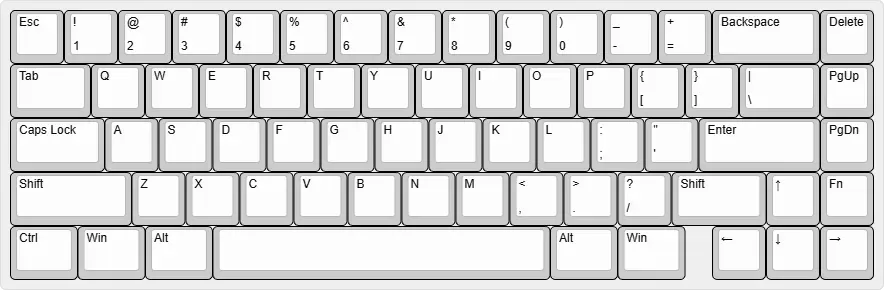
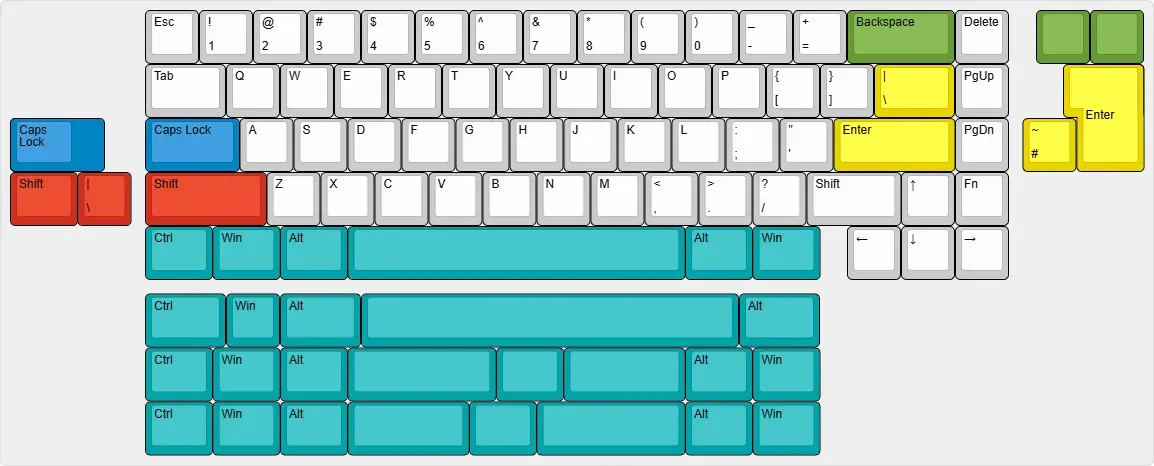
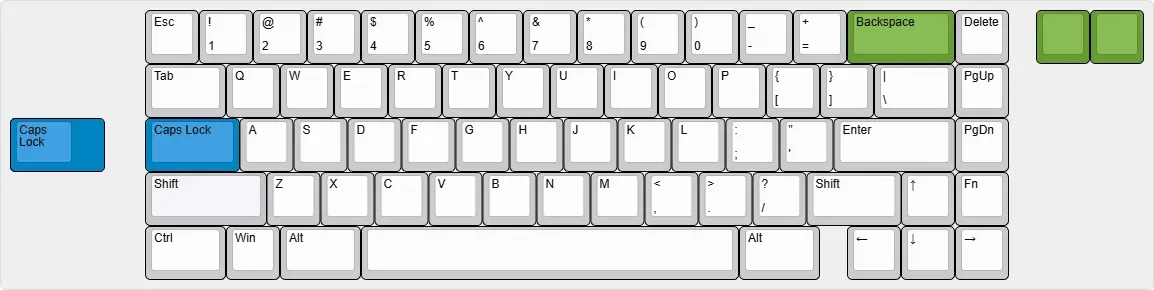
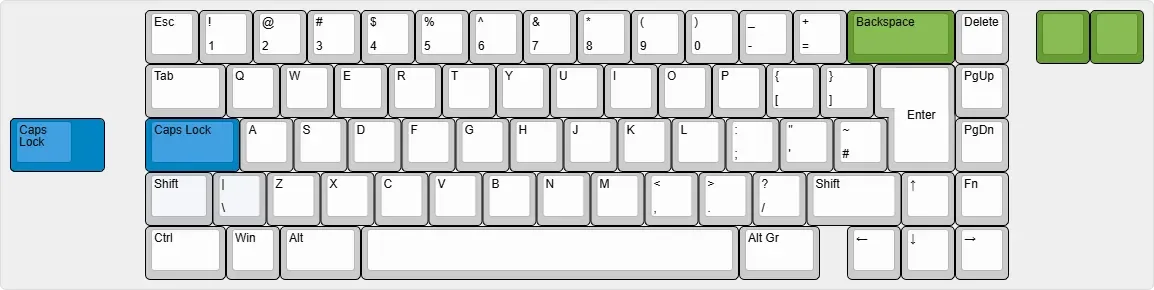
Layout compatibility:
HE layout
MX solder layout
MX hotswap ANSI layout
MX hotswap ISO layout
Typing Feel & Acoustics
Kafka can be configured with two different mounting styles. Each of these will have its unique type feel and sound signature.
Plate Gaskets:
This configuration provides a solid type feel and bassy sound signature. It is the more muted configuration between the two.
O-ring Gasket:
This configuration provides a responsive and bouncier type feel and has a distinctively higher pitch and brighter sound signature.
Materials & Natural Variation
Kafka uses the following materials:
- Walnut/Maple
- PC
- Brass
Natural variances and changes in these materials are to be expected.
Below are specific notes for some of the materials used in the Kafka:
Wood Components
- Wood is a natural material and will vary in:
- Grain pattern
- Colour
- Texture
- Small knots, mineral streaks, or natural figuring may be present.
- Minor changes due to temperature and humidity are normal.
- Any variations that do not affect the assembly will not be considered as defects.
PC Components
- PC materials may show faint surface marks.
- These marks are normal and not considered scratches.
- PC material may yellow over time due to environmental exposure.
Brass Components
- Brass may naturally oxidise over time.
- Protective coatings are applied, but light oxidation may still occur during transport or use.
- Light oxidation is considered normal and not a quality defect.
Quality Control (QC) Standards
Kafka units are inspected according to defined QC standards before shipment.
- QC applies to external, visible surfaces and functional components.
- Internal surfaces or areas not visible during normal use are not considered for cosmetic QC.
- Minor cosmetic imperfections that do not affect function or durability are acceptable.
A unit is considered defective only if:
- There is a functional failure, or
- There is cosmetic marks larger than 1×1mm on visible exterior surfaces.
Exchanges, Refunds & Warranty
- Exchanges or refunds are offered only in cases of confirmed manufacturing defects.
- Change-of-mind returns are not accepted.
- Units must be inspected within 7 days of delivery.
- Proof of defects (photos and/or unboxing video) is required for any claim.
- PCB warranty claims require proof of DOA or functional defect.
Full details will be provided by your regional vendor.
requently Asked Questions
Q: Why does my unit look slightly different from others online?
A: Kafka uses natural and semi-natural materials. Variations in grain, colour, and finish are expected.
Q: Is VIA supported?
A: The hall-effect PCB utilises Geon’s Venom configurator instead of VIA. Our MX-compatible PCBs will be Vial-compatible.
Q: Can I cancel my pre-order?
A: Cancellation policies are determined by each regional vendor. Please check before ordering.
Q: When will shipping dates be confirmed?
A: Shipping timelines are estimated to be 4 months after pre-order closes.